Data Engineering / Analytics · Mini Project
Orders Data Pipeline
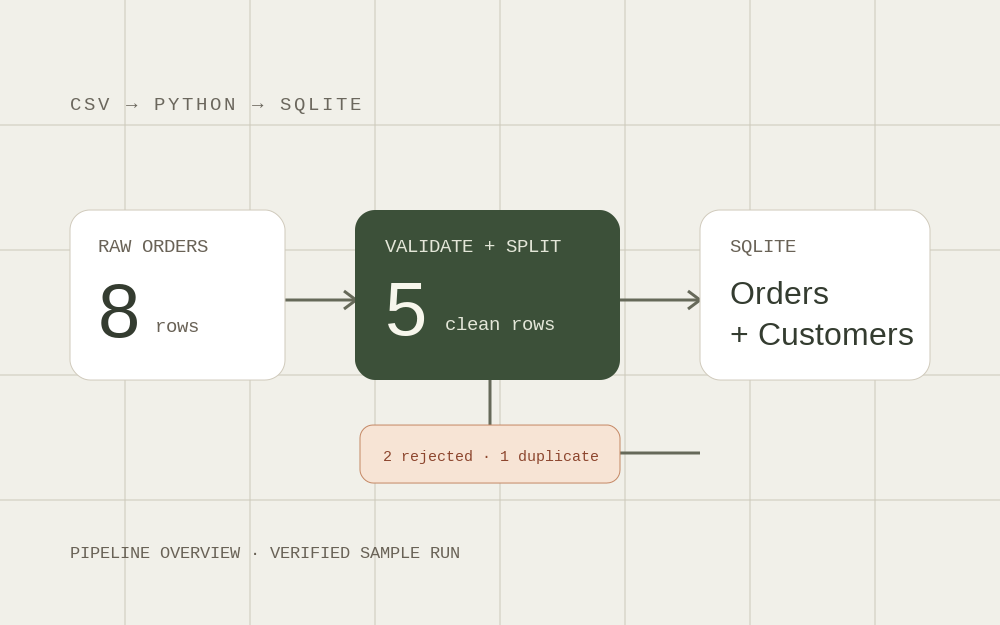
A small Python → SQLite pipeline that sets bad rows aside instead of dropping them, survives a rerun without duplicates, and checks revenue per customer.
Learning project · 8-row practice dataset · Completed · Updated
At a glance
- Question
- Can a small, messy orders CSV load the same way every time, while keeping the bad and duplicate rows where I can see them?
- Data
- Practice CSV in the project repository: 8 order rows, 3 customers Practice data
- Tools




8 → 5
Raw rows → clean orders
2 rejected, 1 duplicate
5 → 5
Orders after a repeat load
no duplicate inserts
The problem
I wanted a small, messy orders CSV to load into a local database the same way every time, without quietly losing the rows that don’t fit. Rejected and duplicate records had to be kept somewhere I could inspect them.
The data and what I built
A practice dataset in my repository: 8 order rows and 3 customers. The project has Python cleaning scripts, SQLite loaders, SQL reports, and separate CSV outputs for clean, rejected and duplicate rows. It’s a learning project on sample data.
How it works
Python reads the source CSV, checks for missing customer IDs and negative amounts, and sets repeated order IDs aside. Valid orders and customers load into SQLite through parameterized INSERT OR IGNORE statements with primary keys. SQL reports join customers to orders and add up completed-order revenue.
How I checked it
I ran the repository scripts locally on September 12, 2026. From 8 source rows, the cleaner produced 5 clean rows, 2 rejected rows and 1 duplicate. The database held 5 orders and 3 customers, and running both loaders again kept those counts. A LEFT JOIN check found no unmatched customer IDs in this sample.
What I found
Completed orders total $300 in sample revenue: Maya $170, Aarav $100, and Noah $30. September 1 and September 2 each have 2 completed orders totaling $150. One clean order is cancelled. These are findings about the dataset, not measured business impact.
What it doesn’t show
The sample is small and the workflow is manual. Integer conversion happens before validation, so a malformed number can stop the cleaner. Dates and statuses aren’t fully validated. INSERT OR IGNORE stops duplicate inserts but doesn’t update an order whose values change. And the unmatched-customer query only diagnoses integrity; it doesn’t enforce foreign keys.
Reproduce the result
Run these from the order-data-pipeline folder with Python 3. The current scripts live in src; some README commands still use older paths.
mkdir -p data/clean data/rejected data/duplicates warehouse
python3 src/clean_orders.py
python3 src/load_orders.py
python3 src/load_customers.py
python3 src/reports.py
# Repeat both loaders to check duplicate prevention.
python3 src/load_orders.py
python3 src/load_customers.py
What I’d recommend
I’d validate types before converting them, turn on foreign keys in SQLite, and swap INSERT OR IGNORE for an upsert so changed orders actually get updated.
Figures